 Worlds Within
Move Worlds Within progress: export, import and restore purchases
Back up your level progress before switching devices. Restore a purchase separately through its original account and channel.
1. Export before you leave
On the old device, open Menu → Settings → Data → Export progress. Save the full JSON progress backup and save it somewhere you control. A short progress code is also supported, but a full backup is preferable when you have many completed gardens.
2. Import on the new device
Open the game on the new device and open Menu → Settings → Data → Import progress. Select the saved JSON backup. Use the separate Import button under Progress code for a short code. Imported completed levels are merged with the local record; keep the old backup until you have checked the result.
3. Restore ownership if needed
For Web, sign in using the email used for the Web purchase and restore ownership. For a native store build, use the corresponding original Apple or Google account. Moving to a different purchase platform does not automatically transfer the unlock.
What a backup does not contain
A progress export is not proof of payment. It does not carry email sessions, purchase tokens or the signed Web offline license. Email sign-in does not upload or recover your local level progress.
If you already lost the old data
Try any backup you previously exported. Without a backup, automatic cloud progress recovery is not available. Contact support with the version and problem description; do not send passwords, email verification codes or full payment credentials.
Full JSON backup: exact menu path
- On the old device: Menu → Settings → Data → Export progress. Keep the downloaded JSON file.
- On the new device: Menu → Settings → Data → Import progress. Select that JSON file.
- Check that your completed gardens and current garden are present before deleting anything on the old device. Restore the purchase separately if needed.
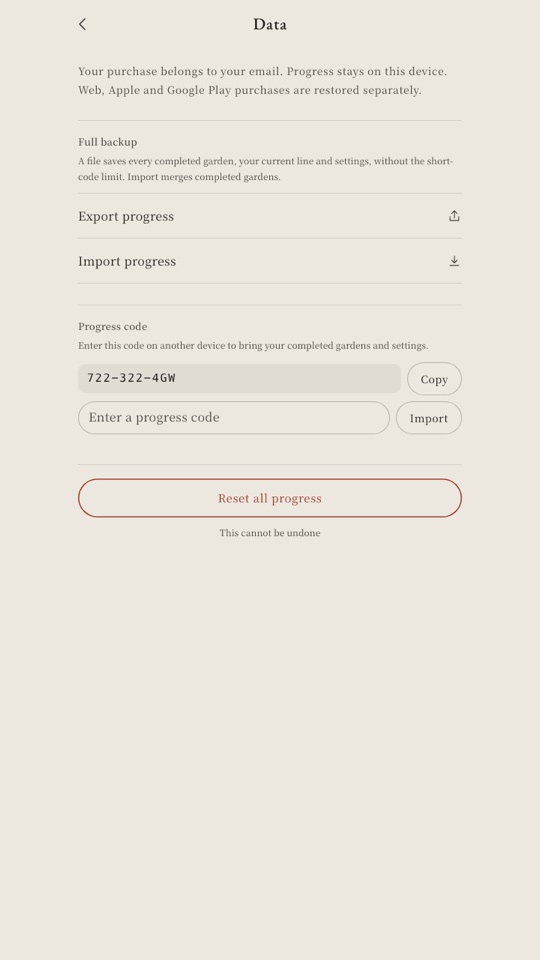
Verified on 2 November 2026 in two isolated desktop browser storage contexts: complete free garden 1 → download JSON → import into fresh storage → completion restored. Invalid JSON left existing progress unchanged. This is a browser migration test; Android/iOS file pickers and physical devices have not yet been verified.
Troubleshoot an import
Import failed? Keep the original file. Choose the full exported .json file, not a screenshot or renamed document. The game rejects invalid backup data and files larger than 1 MB. If import succeeds but paid gardens remain locked, restore the purchase through its original platform; importing progress cannot grant ownership.
The first 10 levels are free. One purchase unlocks the rest. No ads or subscriptions.